DOTA recipes train on a 1024×1024 canvas. Real scenes are often larger. When the input exceeds that canvas, odet image-demo switches to pad/tile automatically: overlapping 1024×1024 windows, detections mapped back to full-image coordinates, then merge NMS.
The Hub checkpoint in the commands below is oriented_rcnn_dota_le90_1x. It was retrained after a diagonal-flip bug in the data pipeline — the boxes and headings on this walkthrough come from that corrected weight.
pip install oriented-det
odet pretrained download oriented_rcnn_dota_le90_1x
In a training or inference config:
"load_from_checkpoint": "hf://oriented_rcnn_dota_le90_1x"
On a single tile (bundled recipe + sidecar config from pretrained/):
odet image-demo demo.jpg hf://oriented_rcnn_dota_le90_1x \
  --out-file result.jpg --device cuda \
  --score-thr 0.55 --nms-thr 0.1
Weights, config sidecar, and training log: pretrained/oriented_rcnn_r50_fpn_dota_le90_1x-725c244f.* · Recipe: configs/oriented_rcnn/dota_le90_1x.json
Large images: sliding-window inference Link to heading
Example — ship detection on demo/large.jpg (1299×1904):
odet image-demo demo/large.jpg hf://oriented_rcnn_dota_le90_1x \
  --out-file result.jpg \
  --score-thr 0.55 --nms-thr 0.1 \
  --window-batch-size 8 --classes ship
Typical CLI output:
Preprocessing: resize_mode=fixed, target_size=(1024, 1024) (model canvas 1024×1024)
Inference thresholds: score>=0.55, merge NMS IoU<=0.1, overlap_pixels=200, ignore_margin_pixels=0.0
  -> pad/tile (image 1299×1904 vs canvas 1024×1024, overlap_pixels=200, 6 windows)
  -> detections (score >= 0.55, NMS <= 0.1)
  -> after class filter ['ship']
Saved visualization to result.jpg
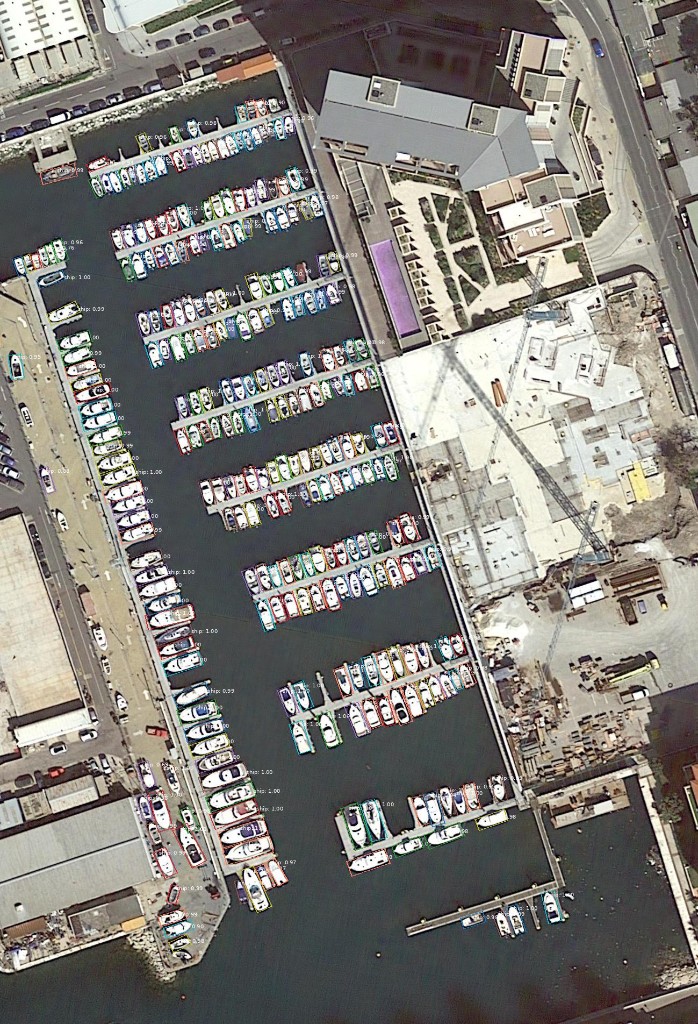
Each docked vessel gets a rotated box aligned to its hull, with no visible seams at the six window boundaries.
What to notice:
- 6 windows for this image size — modest overhead compared with a single tile.
--window-batch-size 8batches window inference on GPU (all six windows in one pass here).--classes shipkeeps one DOTA class after detection.overlap_pixels=200comes from the bundled recipe default — fine for DOTA-scale objects; increase it if your targets are larger than the overlap band, or they can be split across window boundaries.--score-thr 0.55is the Hub deploy floor for this 1× slug (production.score_threshold). The bundleddemo.jpgbus tile uses the same default.
For a zero-shot maritime experiment on a Copernicus Sentinel-2 tile — zoom, overlap, and margin tuned for small ships — see Zero-shot ship detection on a Copernicus Sentinel-2 tile with Oriented R-CNN.
Demo thresholds (short note) Link to heading
--score-thr and --nms-thr on odet image-demo are post-decode filters. Values tuned on one architecture do not transfer to the others. Hub 1× deploy floors: Oriented R-CNN 0.55, Rotated Faster R-CNN 0.60, FCOS 0.20, RetinaNet OBB 0.25 (HBB 0.35). Copying 0.70 onto FCOS will hide most of the scene.
0.5 is the mAP matching IoU on DOTA Task 1, not detection NMS. Recipes use production.final_nms_iou_threshold: 0.1.
Links Link to heading
- OrientedDet on GitHub
- Pretrained weights README
- Oriented R-CNN config guide
- Later in this series: Rotated Faster R-CNN with ProbIoU — 74.42% Task 1
- Earlier posts in this series: macOS pure-Python inference, v0.1.0 release
June 29, 2026 — Jeff Faudi